
The Rotate module in Evoto for iPad allows precise control over image orientation, including rotation and mirroring, with optional AI-powered alignment.
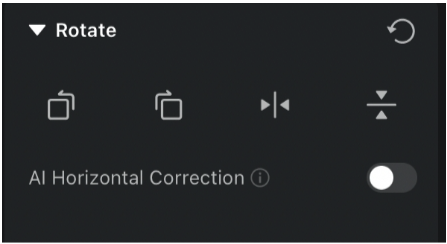
Rotate Options
Evoto for iPad supports the following orientation tools:
- Clockwise Rotation
- Counterclockwise Rotation
- Horizontal Flip (mirror left to right)
- Vertical Flip (mirror top to bottom)
You can also use the rotation slider to make fine adjustments to image alignment:
- Slider Range: –45° to +45°
AI Horizontal Correction
Evoto for iPad includes an AI Horizontal Correction tool to automatically straighten images.
- Tap the Auto button to enable this feature.
- When active, the Auto button will turn yellow.
- The AI will analyze the image and apply a horizon correction automatically.
Interaction Between AI Horizontal Correction and Rotation Tools
Evoto ensures seamless integration between manual rotation and AI adjustments:
- Manual Rotation
- Adjusts the image’s horizon based on the rotation direction you choose.
- Adjusts the image’s horizon based on the rotation direction you choose.
- Clockwise/Counterclockwise Rotation with AI
- When you apply AI Horizontal Correction after rotating the image, the AI intelligently recalculates the horizon based on the rotated orientation.
- When you apply AI Horizontal Correction after rotating the image, the AI intelligently recalculates the horizon based on the rotated orientation.
- Mirroring and AI Correction
- After performing a horizontal or vertical flip, the AI Horizontal Correction feature will recalculate and apply correction based on the new image orientation.
Was this article helpful?
YesNo




