Once your photos are ready for delivery, they appear in the Shared stage of the workflow or in the Shared section of the project page. From here, you can manage how galleries are shared with guests. Evoto Instant provides two types of sharing links—Full Gallery links and Personal Gallery links—each serving different purposes. Available sharing options may vary depending on the selected project mode, ensuring a unified and relevant setup experience.
Mode 1: Classic Mode (Best suited for event scenarios)
- Default Settings: Full Gallery: ON; FaceKey: OFF
In Classic Mode, sharing settings default to Full Gallery. You can choose how visitors access the Full Gallery, either with or without an access code (Public Access). When guests enter the gallery, they can browse all photos in the event.
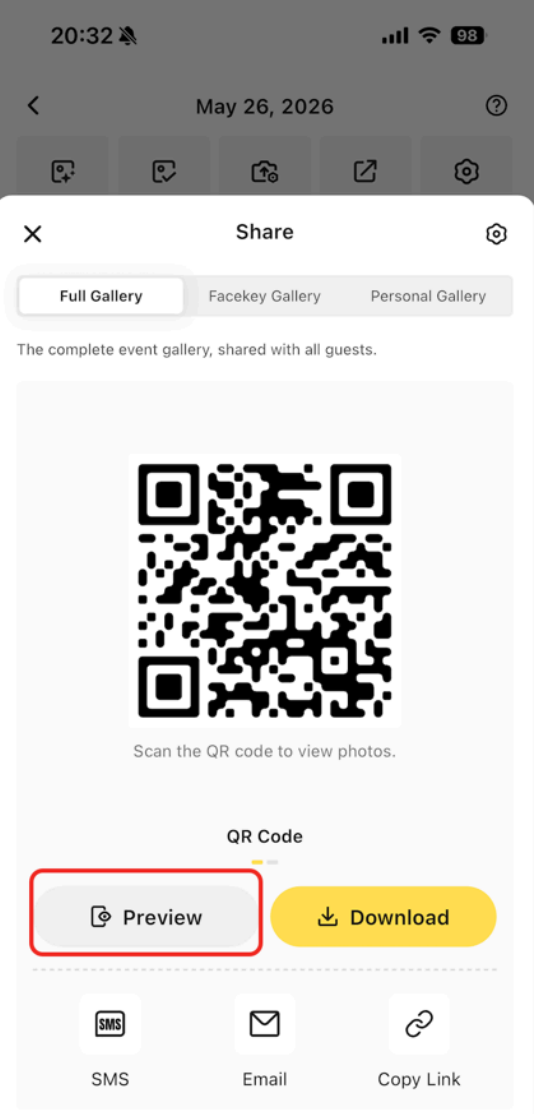
The FaceKey feature is available in Classic Mode and can be turned on to help guests quickly locate their own photos within the gallery. (Note: The ‘FaceKey’ feature must be enabled individually for each project in order for viewers to access and use it)


- Viewing Individual Photos Only: Full Gallery: OFF; Personal Gallery: ON.
If you want guests to view only their own photos, turn Full Gallery OFF. When Full Gallery is turned OFF, the system switches to Personal Gallery and defaults to Public Mode. It can also be changed to Access Code mode, allowing participants to access their individual galleries using a code.
- How Guests Access Individual Galleries
There are two ways for guests to access their individual galleries:- Interact Feature
Use the Interact (Face Recognition) feature to generate a Personal Gallery link and send it directly to the corresponding guest. - FaceKey Feature
Guests can upload or take a reference photo themselves. The system will match their face and grant access to a gallery containing only their photos, without exposing other participants’ images.
- Interact Feature
Mode 2: Participant Mode (Roster-Based)
- Individual gallery links are automatically generated for each participant.
- The system defaults to Access Code mode, but can also be switched to Public Access as needed.
The “FaceKey” Feature
The FaceKey feature helps guests quickly locate their photos within a gallery. By uploading or taking a quick reference photo, the system searches the gallery and instantly returns matching results. This saves time for guests who don’t want to scroll through hundreds of images.
- FaceKey in Full Gallery
When FaceKey is enabled under Full Gallery, visitors can locate their own photos while still being able to view all photos in the gallery.
- FaceKey in Personal Gallery
When FaceKey is enabled under Personal Gallery, guests receive a personal link that shows only the photos they appear in. They cannot view other participants’ photos.
Note: The ‘FaceKey’ feature must be enabled individually for each project in order for viewers to access and use it.


Refreshing New Photos (Guest Perspective)
To avoid interrupting the guest experience, new photos are added seamlessly to galleries. A red “New” tag appears on the refresh button whenever new content is available. Guests can:
- Tap the refresh button, or
- Pull down to refresh the gallery view.

Sorting and Viewing Options (Guest Perspective)
Guests can browse galleries with flexible controls:
- Sorting – Photos are sorted by capture time. You can switch between ascending and descending order. By default, the newest photos appear at the top.
- View Modes – Galleries open in a waterfall flow by default, but guests can switch to a grid (3×3) view if they prefer.
Gallery Sharing (Guest Perspective)
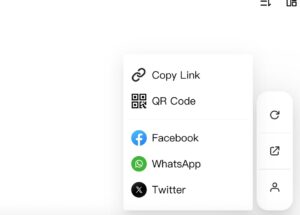
When guests access their gallery, they are able to share their gallery directly to specific social apps, including Facebook, Twitter, and WhatsApp. This feature allows participants to quickly and easily share their photos with friends and family, without needing to download or manually upload images.
Evoto Instant gives you the flexibility to share photos openly with all guests or securely with individuals. Whether using Full Gallery links for event-wide access or Personal Gallery links for private delivery, your guests can enjoy a seamless viewing experience.
Interact and Participant Sharing Updates
FaceKey Gallery is the dedicated face-search gallery. Visitors enter the face-scan flow and can view matching photos without browsing the full event gallery.
Personal Gallery is created for a specific participant through Interact. It contains photos associated with that participant and can optionally provide access to the full event gallery.
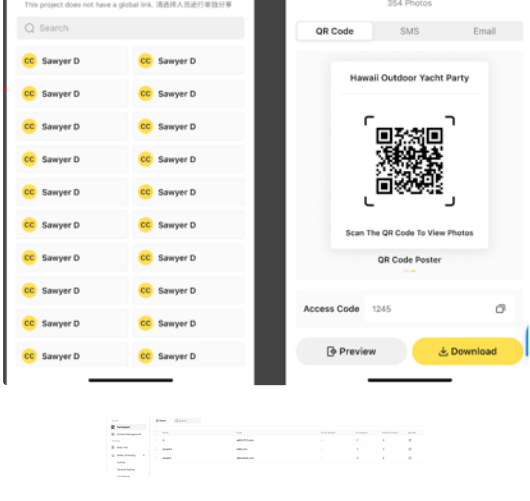
Interact supports participant-level QR code sharing. Open a participant’s sharing panel to display an on-site QR code or download a QR poster. Participant cards also show the corresponding Access Code in plain text. When visitors scan and submit information, the collected information is added to the Participant List.