The Color Adjustments panel in Evoto Video includes LUT-based tools and manual color controls. Use it to correct the base image, apply a creative look, and adjust specific tones or colors. These tools can be combined with AI Color Match and Portrait Retouching.
Video Scopes
Video scopes show brightness and color information for the current frame. Use them as an objective reference when judging exposure and color, rather than relying on the preview alone.
Basic Adjustments
Basic controls correct common image issues before you apply a creative look.
- White Balance and Color correct color casts.
- Tonal Adjustments correct brightness and contrast.
- Sharpening, Noise Reduction, and Artifact Removal improve clarity in soft, underexposed, or noisy footage.
Advanced Adjustments
Advanced controls adjust specific tonal ranges and individual colors.
- Levels, RGB Curves, and Color Wheels adjust shadows, midtones, and highlights. RGB Curves can also adjust the red, green, and blue channels separately.
- HSL and HSL Curves adjust selected colors without changing the rest of the image.
- Calibration refines the overall color balance.
Color Warper
Color Warper changes selected colors on a grid. Drag a control point to shift that color. Nearby colors follow the point, so the change blends into the surrounding color. Use it to adjust a color such as denim or grass while leaving skin tones unchanged.
Color Correction
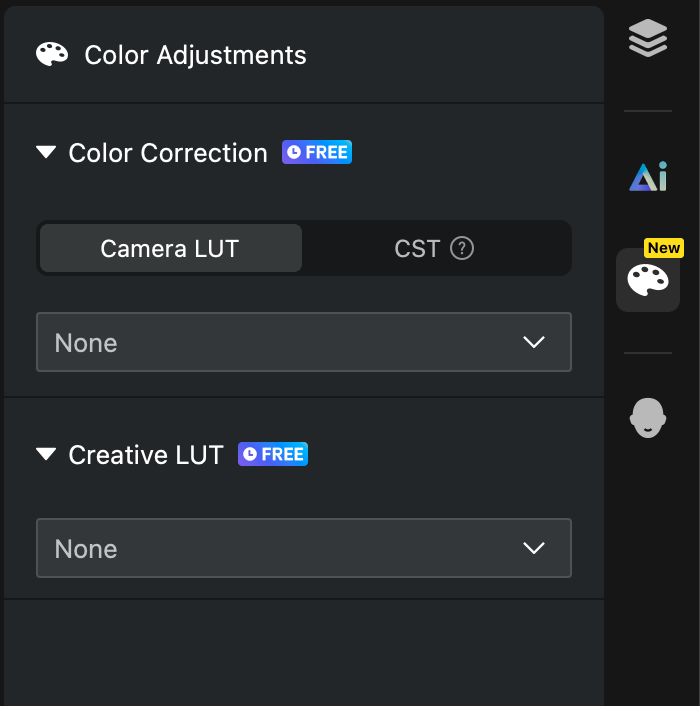
Color Correction restores flat, low-contrast Log footage to a normal-looking image. It offers two methods, and only one can be active at a time:
- Camera LUT: Official restoration LUTs provided by camera manufacturers. Choose the LUT that matches the Log mode used during shooting (for example, Sony S-Log3, Canon Log 3, or DJI D-Log). If you are unsure of the Log mode, leave it set to None rather than guessing.
- Color Space Transform (CST): A more precise restoration method for users who know the input color space and gamma of their footage. It is useful for normalizing footage shot on multiple cameras.
Note: Camera LUT and Color Space Transform cannot be enabled at the same time.
Creative LUTs
Creative LUTs apply an overall visual style—such as a cinematic, vintage, warm, or cool look—after the base image has been corrected. Creative LUTs can be stacked with Color Correction and AI Color Match to further refine the final result.
Additional built-in Creative LUTs include Night Cityscape, Night Fireworks, Fujifilm NH, Retro HK Style, Teal & Orange, Spring Picnic, Clear Winter Snow, Kodak UltraMax 400, Autumn Stroll, and Midsummer Sun.
Custom LUTs
You can import your own LUT files in .cube format. Both custom Camera LUTs and custom Creative LUTs are supported, which is useful for teams with established color styles or projects that require a specific look.
Current Limitations
- Camera LUT and Color Space Transform cannot be used together.
- Color Correction and Creative LUTs are currently applied at the clip level .