
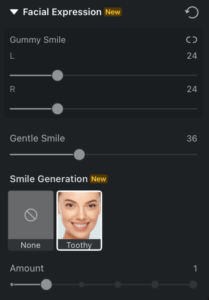
Gummy Smile
This tool provides precise control over the amount of gum visible when a subject smiles by adjusting the upper lip position. It is particularly useful for reducing the appearance of a “gummy smile” or minimizing the protrusion of teeth.
- The left and right sides of the upper lip can be adjusted independently for more precise and natural-looking correction, allowing you to fine-tune each side as needed.
Gentle Smile
The Gentle Smile tool allows you to subtly enhance the corners of the mouth, introducing a soft, natural smile.
- This effect focuses exclusively on refining the mouth’s shape and does not influence other facial features, ensuring a focused and subtle enhancement.
Smile Generation
The Smile Generation feature allows you to create a natural-looking smile that intelligently adapts to the unique contours of the face in real time.
- It offers five distinct levels of intensity, ranging from a slight, subtle smile to a full, expressive laugh.
- The tool primarily focuses on the mouth area, adjusting the corners and overall shape to generate a range of expressive variations that feel organic to the subject’s face.
Was this article helpful?
YesNo




