
Once your photos reach the Shared stage of the workflow, they’re ready to be delivered to guests. Evoto Instant makes this process simple, secure, and customizable—ensuring that every guest can easily find their photos while you maintain full control over branding and presentation.
Gallery Access Methods
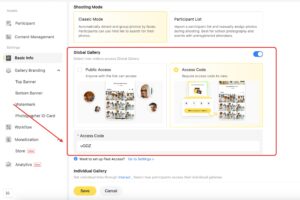
Visitors can access both Global Gallery and Individual Gallery using the following access methods. These options allow you to share with privacy control based on your needs.
- Public Access: Anyone with the gallery link can view the gallery without additional verification.
- Access Code: Visitors must enter a unique access code to view the gallery, providing an extra layer of security and controlled access.
The “Find Me” Feature
The Find Me feature helps guests quickly locate their photos within a gallery. By uploading or taking a quick reference photo, the system searches the gallery and instantly returns matching results. This saves time for guests who don’t want to scroll through hundreds of images.
- Find Me in Global Gallery
When Find Me is enabled under Global Gallery, visitors can locate their own photos while still being able to view all photos in the gallery.
- Find Me in Individual Gallery
When Find Me is enabled under Individual Gallery, guests receive a personal link that shows only the photos they appear in. They cannot view other participants’ photos.
Note: The ‘Find Me’ feature must be enabled individually for each project in order for viewers to access and use it.


Interact Feature (Individual Gallery Only)
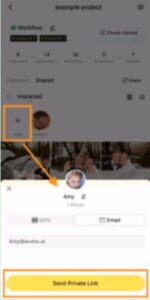
The Interact feature is available only in Individual Gallery. Use this feature to generate a personal gallery link for each guest. A Personal Link contains only the photos belonging to a single guest. Each guest receives one unique link, ensuring private and secure access to their own photos.
- How to Create:
- Open the Shared section of your project.
- Go to Interacted.
- Click Add, then select the person based on face-recognition grouping.
- Delivery Methods:
- SMS – send the personal link directly to a guest’s phone.
- Email – deliver the link to a guest’s inbox.
This method ensures privacy while giving every guest a direct connection to their own images.
Global Gallery Sharing
The global gallery contains all photos from your event. You can share this gallery with guests in several ways:
- Open Link – generate a single link that can be shared with anyone.
- QR Code – print or display a QR code on-site for guests to scan and access the gallery instantly.
- Password-Protected Portal – add a layer of security by requiring a password before viewing. (Available only through the Web Portal.)
Global galleries are best when you want guests to browse the entire collection from the event.

Private Gallery Sharing
For more personalized interaction, Evoto Instant supports private galleries powered by face recognition.
- Photos are automatically grouped by appearance.
- Each guest receives a unique personal gallery containing only their photos.


Private galleries can be delivered via:
- SMS – a personal link sent directly to a phone.
- Email – a secure link delivered to an inbox.
This method ensures privacy while giving every guest a direct connection to their own images.
Customization Options
Evoto Instant makes it easy to present your galleries professionally and align them with your brand identity. Customization options include:
- Top Banner & Bottom Banner – add banners, cover images, and event titles to the front page of your gallery.
- Watermarks – automatically overlay your logo or text watermark to protect your photos.
- Domain Customization – use your own branded link instead of a generic sharing link for a polished, client-facing experience (Available only through the Web Portal).
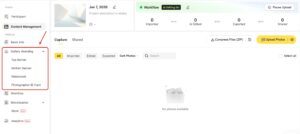

These options can be set in advance when creating or editing a project through the Web Portal or the Project Settings section on the App , giving you full control over how guests experience your galleries.




