
Evoto’s Portrait Retouching feature intelligently analyzes images upon import, automatically detecting faces and assigning each person a character tag based on their gender and age group. This enables highly targeted enhancements that can be applied efficiently across multiple images.
Whether you’re working with group portraits, individual headshots, or batches of event photos, Evoto gives you the flexibility to retouch individuals or apply consistent enhancements across entire projects — all while preserving natural appearances and realistic skin tones.
Face Recognition and Character Tags
Upon analysis, Evoto identifies facial features and assigns gender and age attributes to each character. These tags drive the retouching logic. 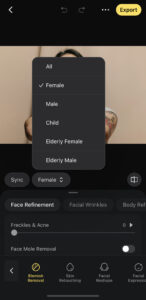
Change Character Attributes
You can adjust the identification manually if automatic tagging is incorrect.
Note: If a character is labeled as Child, the Infant Body Blemish option will appear under the Blemish Removal tools for more delicate skin handling.




